
Tech
Build a robust Google BigQuery pipeline using Python: Part II | by Chubing Tripepi | July 2021
A STRUCT is a container of ordered fields, each with a type (required) and a field name (optional). Google Cloud
In BigQuery, STRUCT is similar to a data frame, so you can have multiple child columns with different column names and data types. By comparison, ARRAY is similar to a Python LIST, so you can nest STRUCTs in ARRAYs or ARRAYs in STRUCTs.
The STRUCT type is declared using angle brackets (< and >). The type of STRUCT element is mandatory and can be any complexity. Field names are optional and you can use duplicate field names. If a field name is missing, the field is considered anonymous.
The advantage of using a STRUCT is that it reduces the hassle of duplication when joining tables. However, access to non-technical users is even more difficult.
To read more about building STRUCTs, Google Cloud has very good documentation on this topic.
You can use the DOT annotation to query the items contained in the STRUCT. UNNEST is a function to use when you need to flatten nested structs such as STRUCT and ARRAY in BigQuery.
SELECTuser.user_id, -ARRAYuser.gender, -STRINGuser.is_active, -BOOLEAN FROM`my-project.my_dataset.user_info`, UNNEST (user) user
Some quirks worth mentioning:
The NOT NULL function does not work if the field is an ARRAY nested in a STRUCT (that is, if user.user_id is NOT NULL). Rows with null values will continue to be returned. If I use LENGTH (user.user_id)> 0 in the WHERE clause, this works! The UNNEST function may cause duplicate rows. This is because UNNEST is running CROSS JOIN on all the fields in the table. To avoid this, consider creating an ARRAY with a STRUCT or using only UNNEST for the fields required by the subquery.
If you download the STRUCT in Python without using UNNEST, it will appear in the DataFrame as a list of dictionaries.
Download STRUCT to DataFrame
Due to Pyarrow serialization restrictions, BigQuery I / O does not support uploading STRUCT structures to the BQ of Pandas DataFrame. When I checked last time, this is a persistent issue after the release of Pyarrow 2.0 (see this thread). However, this issue was raised by a Google Cloud engineer and seems to be working on a fix, so it’s a good idea to check back regularly.
The workaround is to convert the table to a row-based data structure such as JSON or PythonDICTIONARY. I was able to upload the table with STRUCT using JSON. This is an example that might be useful when uploading a table of STRUCT data type to BigQuery.
Import package from google.cloud import bigqueryimport pandas as pdData Structure
To upload a STRUCT to BigQuery, the data structure for that column must be a list of DICTIONARY. Think of it as creating a list of DICTIONARYs that will be converted to a DataFrame.
Data = pd.DataFrame ([{item: album, user: [{user_id: [50, 25], Gender: M, is_active: True},]}, {Item: Jacket, User: [{user_id:[20, 30, 35], Gender: F, is_active: False}]},]) # Convert DataFrame to list of dict formatdata_json = data.to_dict (‘records’)
Once the DataFrame is ready, here is an example schema for STRUCT.
Schema = [bigquery.SchemaField(name=”item”, field_type=”STRING”, description=”an item user purchased”),
bigquery.SchemaField(“user”,”STRUCT”,fields=[bigquery.SchemaField(“user_id”, “STRING”, mode=”REPEATED”, description=”User’s internal user_id; users can have e multiple ids”),bigquery.SchemaField(“gender”, “STRING”, mode=”NULLABLE”, description=”User’s gender”), bigquery.SchemaField(“is_active”, “BOOLEAN”, mode=”NULLABLE”, description=”User’s active status. True if user logged in in the past 7 days, else False”), ], Mode = “REPEATED”,),]
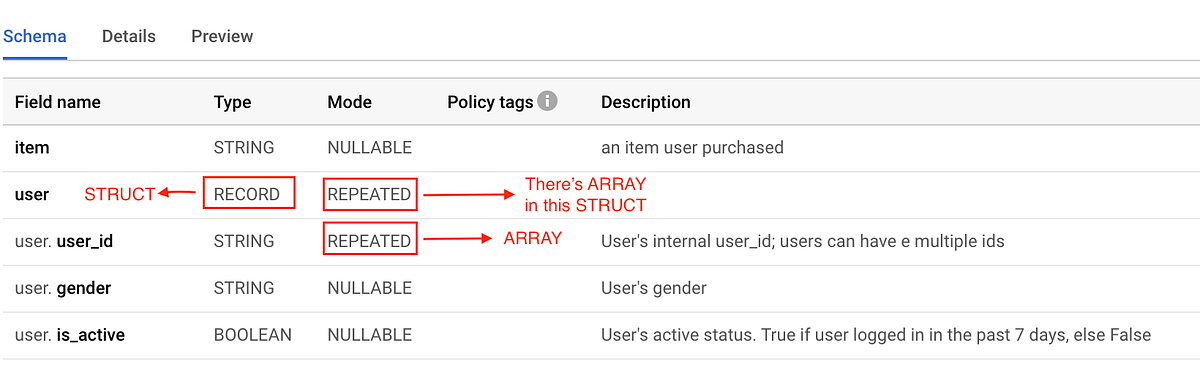
In the BigQuery console, you can see that the STRUCT type is RECORD, while the ARRAY mode is REPEATED.
If this STRUCT has a field of type ARRAY, mark the STRUCT mode as REPEATED. If not, you can leave the mode nullable.
BQ console STRUCT schema
Now that the schema is ready, you can upload the table from the client object using the load_table_from_json function.
client = bigquery.Client (project = your_project_name)
job_config = bigquery.LoadJobConfig (schema = your_schema, destination_table_description = your_table_description, write_disposition =’WRITE_TRUNCATE’)
job = client.load_table_from_json (data_json, table_id, job_config = job_config) job.result ()
This is what the table looks like after uploading to BigQuery.
Example of STRUCT using nested array
I hope you find this simple example of working with BigQuerySTRUCT useful. If you have any questions, feel free to comment or contact us 🙂
reference:
Data type STRUCT that specifies nested repeating columns in the table schema
|
Sources 2/ https://towardsdatascience.com/build-robust-google-bigquery-pipelines-with-python-part-ii-2883423a1c8a The mention sources can contact us to remove/changing this article |
What Are The Main Benefits Of Comparing Car Insurance Quotes Online
LOS ANGELES, CA / ACCESSWIRE / June 24, 2020, / Compare-autoinsurance.Org has launched a new blog post that presents the main benefits of comparing multiple car insurance quotes. For more info and free online quotes, please visit https://compare-autoinsurance.Org/the-advantages-of-comparing-prices-with-car-insurance-quotes-online/ The modern society has numerous technological advantages. One important advantage is the speed at which information is sent and received. With the help of the internet, the shopping habits of many persons have drastically changed. The car insurance industry hasn't remained untouched by these changes. On the internet, drivers can compare insurance prices and find out which sellers have the best offers. View photos The advantages of comparing online car insurance quotes are the following: Online quotes can be obtained from anywhere and at any time. Unlike physical insurance agencies, websites don't have a specific schedule and they are available at any time. Drivers that have busy working schedules, can compare quotes from anywhere and at any time, even at midnight. Multiple choices. Almost all insurance providers, no matter if they are well-known brands or just local insurers, have an online presence. Online quotes will allow policyholders the chance to discover multiple insurance companies and check their prices. Drivers are no longer required to get quotes from just a few known insurance companies. Also, local and regional insurers can provide lower insurance rates for the same services. Accurate insurance estimates. Online quotes can only be accurate if the customers provide accurate and real info about their car models and driving history. Lying about past driving incidents can make the price estimates to be lower, but when dealing with an insurance company lying to them is useless. Usually, insurance companies will do research about a potential customer before granting him coverage. Online quotes can be sorted easily. Although drivers are recommended to not choose a policy just based on its price, drivers can easily sort quotes by insurance price. Using brokerage websites will allow drivers to get quotes from multiple insurers, thus making the comparison faster and easier. For additional info, money-saving tips, and free car insurance quotes, visit https://compare-autoinsurance.Org/ Compare-autoinsurance.Org is an online provider of life, home, health, and auto insurance quotes. This website is unique because it does not simply stick to one kind of insurance provider, but brings the clients the best deals from many different online insurance carriers. In this way, clients have access to offers from multiple carriers all in one place: this website. On this site, customers have access to quotes for insurance plans from various agencies, such as local or nationwide agencies, brand names insurance companies, etc. "Online quotes can easily help drivers obtain better car insurance deals. All they have to do is to complete an online form with accurate and real info, then compare prices", said Russell Rabichev, Marketing Director of Internet Marketing Company. CONTACT: Company Name: Internet Marketing CompanyPerson for contact Name: Gurgu CPhone Number: (818) 359-3898Email: [email protected]: https://compare-autoinsurance.Org/ SOURCE: Compare-autoinsurance.Org View source version on accesswire.Com:https://www.Accesswire.Com/595055/What-Are-The-Main-Benefits-Of-Comparing-Car-Insurance-Quotes-Online View photos

 |
 |
 |